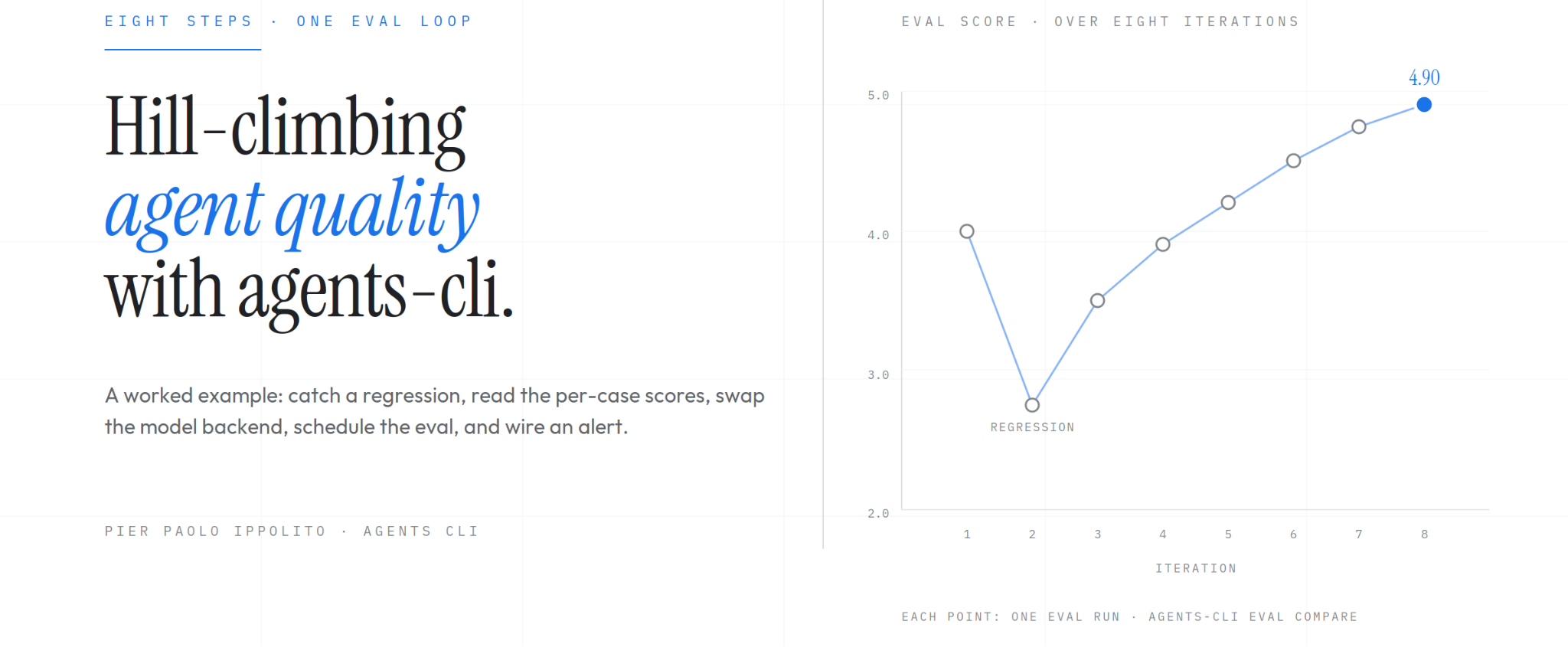
Hill-Climbing Agent Quality with Agents CLI Evaluation
The Eval Loop for Hill-Climbing
Building an agent that works on a demo is a different problem from building an agent that stays working across model upgrades, tool changes, and new conversation shapes.
The first takes a weekend; the second takes a loop. A team writes test cases, runs them, grades them, reads what failed, changes the agent, and runs the cases again. If the score goes up, the change was good. If it goes down, revert.
Over weeks of this, the agent inches toward the ceiling of what the model, tools, and prompt can do together. The quality-engineering name for this is hill-climbing.
The Agents CLI eval namespace was built around this loop. The commands are small and framework-agnostic:
eval generateruns the agent against a dataset of caseseval gradescores the generated traceseval comparediffs two run results side by sideeval analyzeclusters failures into themeseval optimizeruns an automated hill-climbing pass on the agent's prompt
Below: baseline → regression → model swap → scheduling and alerting.
Scaffold Setup
The scaffold used throughout is the LangChain template that ships with Agents CLI v1.8.0. The setup is a single command:
agents-cli create my-agent \
  --agent google/agents-cli/extensions/langchain/template@v1.8.0 \
  -d cloud_run
cd my-agent && agents-cli install
The scaffold ships with an eval dataset at tests/eval/datasets/basic-dataset.json, a config at tests/eval/eval_config.yaml, and a custom LLM-as-judge metric at tests/eval/response_quality.py.
The config declares the metric to run:
# tests/eval/eval_config.yaml
metrics_to_run:
  - custom_response_quality
custom_metrics:
  - name: custom_response_quality
    custom_function_file: response_quality.py
The metric grades each response on a 1-to-5 scale for accuracy, relevance, and clarity, using gemini-3.8-flash as the judge.
The default dataset has a single trivial case, which is not enough for a hill-climb. The first thing we do is expand it to four cases that probe different behaviors:
{
  "eval_cases": [
    {"name": "greeting", "agent_data": {"turns": [{"events": [{"author": "user", "content": {"parts": [{"text": "hello"}]}}]}]}},
    {"name": "sf_weather", "agent_data": {"turns": [{"events": [{"author": "user", "content": {"parts": [{"text": "What is the weather in San Francisco?"}]}}]}},
    {"name": "rome_weather", "agent_data": {"turns": [{"events": [{"author": "user", "content": {"parts": [{"text": "How is the weather in Rome today?"}]}}]}},
    {"name": "off_topic", "agent_data": {"turns": [{"events": [{"author": "user", "content": {"parts": [{"text": "Who won the 2024 World Series?"}]}}]}]}}
  ]
}
Four cases: a greeting, a weather question the mock tool handles with the hardcoded foggy response, a weather question for a city the tool defaults on, and an off-topic question that the agent has to decide how to handle.
This is a small dataset by design; the hill-climbing loop pays off when the dataset is small enough to run on every change.
Baseline Run
With the dataset in place, we run eval generate to drive the agent against each case, then eval grade to score the resulting traces:
agents-cli eval generate --dataset tests/eval/datasets/basic-dataset.json \
  -o tests/eval/output/
agents-cli eval grade --traces tests/eval/output/eval_dataset_*.json \
  --config tests/eval/eval_config.yaml
The baseline run produces:
Evaluation Summary
custom_response_quality:
  num_cases_total: 4
  num_cases_valid: 4
  num_cases_error: 0
  mean_score: 4.0000
  stdev_score: 1.4142
Saved full results to artifacts/grade_results/results_20261003_224516.json
Saved HTML results to artifacts/grade_results/results_20261003_224516.html
Mean 4.0 out of 5 across four cases, with a standard deviation of 1.41. That stdev tells us immediately that the cases are not scoring uniformly, which is a healthier starting point than a flat 5.0 across the board.
A flat 5.0 either means the agent is perfect (unlikely) or the dataset is too easy to show variation. 4.0 with real spread is a hill to climb.
Introducing a Regression
To demonstrate the loop, we introduce a realistic regression. A developer working across several agent projects accidentally pastes the wrong system prompt into our weather agent: a chef persona meant for a different codebase.
In app/agent.py:
# Before
root_agent: CompiledStateGraph = create_agent(
    model=llm,
    tools=[get_weather],
    system_prompt="You are a helpful assistant"
)
# After
root_agent: CompiledStateGraph = create_agent(
    model=llm,
    tools=[get_weather],
    system_prompt=(
        "You are a professional chef. Help users with recipes, cooking "
        "techniques, and ingredient substitutions. Always suggest a recipe "
        "at the end of every response."
    ),
)
The change compiles, the agent still runs, and nothing in the pre-eval pipeline (lint, unit tests, type checks) catches it.
Re-running the same eval generate plus eval grade sequence produces:
Evaluation Summary
custom_response_quality:
  num_cases_total: 4
  num_cases_valid: 4
  num_cases_error: 0
  mean_score: 2.7500
  stdev_score: 0.9574
Saved full results to artifacts/grade_results/results_20261003_225158.json
Mean 2.75, down from 4.0. The judge agrees with our intuition that a chef persona on a weather agent is a worse product than a general-purpose helpful assistant.
The stdev also tightened from 1.41 to 0.96, consistent with the chef prompt pushing most cases toward the same mediocre range.
A 1.25-point drop on a 1-to-5 scale is substantial, and the kind of regression that can slip through code review when the diff looks small ("one string literal changed"). The loop surfaced the change at all, with a specific number attached to it, before the agent reached production.
Comparing Runs
Mean scores are a start; the per-case diff is where the hill-climb happens. eval compare reads two result files and produces a structured JSON diff:
agents-cli eval compare \
  artifacts/grade_results/results_20261003_224516.json \
  artifacts/grade_results/results_20261003_225158.json
The output lists which keys changed and which stayed the same:
{
  "baseline_keys": ["agent_info", "eval_case_results", "evaluation_dataset", "metadata", "summary_metrics", "win_rates"],
  "candidate_keys": ["agent_info", "eval_case_results", "evaluation_dataset", "metadata", "summary_metrics", "win_rates"],
  "changed_keys": ["eval_case_results", "metadata.creation_timestamp"],
  "unchanged_keys": ["agent_info", "evaluation_dataset", "metadata", "summary_metrics", "win_rates"],
  "differences": { "... per-case score diffs ..." }
}
The differences object has the full per-case breakdown with the baseline and candidate values side by side. For a hill-climbing workflow, we typically pipe the output through jq or a small Python script to extract the signal; the raw JSON is the complete evidence.
Walking the two result files and lining up the scores per case shows where the regression landed:
- greeting 5.0 → 4.0 ↓ launched into an unsolicited recipe pitch after "hello"
- sf_weather 4.0 → 2.0 ↓ ignored the weather tool, hallucinated conditions
- rome_weather 2.0 → 2.0 · already hallucinated at baseline; chef persona did not make it worse
- off_topic 5.0 → 3.0 ↓ answered the Dodgers question but tacked on a recipe
Three cases dropped, one held. The most important of the three is sf_weather: the chef persona pulled the model's attention away from the registered get_weather tool, so the agent stopped calling it and started making up weather values.
Unit tests can't catch this: the code runs, the tool is still registered, but the model's behavior around it has shifted. Only an end-to-end eval that scores the response in context surfaces this.
The mean drop by itself (−1.25) is a clear signal, but the per-case breakdown is what tells the developer where to look. A one-line system-prompt change propagated through three different cases in three different ways: greeting lost a point on tone, sf_weather lost two on tool usage, off_topic lost two on scope creep.
Model Backend Experiment
A common hill-climbing question is whether a cheaper or faster model would do the job acceptably. For the LangChain template, the model is defined in app/agent.py:
LLM = "gemini-3.8-flash"
llm = ChatGoogleGenerativeAI(model=LLM, temperature=0)
We swap gemini-3.8-flash for gemini-2.5-flash (restoring the helpful system prompt first), re-run eval generate plus eval grade, and compare the two result files.
The mean drops from 4.00 to 2.75, the same magnitude as the chef-prompt regression, but the per-case breakdown tells a completely different story:
- greeting 5.0 → 5.0 ·
- sf_weather 4.0 → 3.0 ↓
- rome_weather 2.0 → 2.0 ·
- off_topic 5.0 → 1.0 ↓↓
The cheaper model matched 3.8-flash exactly on the greeting and rome_weather cases and lost a point on sf_weather (slightly less polished phrasing). The whole visible drop traces to off_topic, where the cheaper model refused with a hedge about the event "not having happened yet" (a training-cutoff artifact), and the judge marked it harshly.
The lesson is that the summary number is misleading. Look only at the mean and you'd call gemini-2.5-flash as bad as the chef prompt. Look at the per-case breakdown and you'd call it a reasonable swap for most of the agent's workload, with one case (handling out-of-scope questions about recent events) exposing a real limitation.
If the production distribution of user questions matches the first three cases more than the fourth, the swap is worth considering. If off_topic-style questions are common, it is not.
Two caveats on this experiment. First, model swaps interact with the prompt: a prompt tuned for a stronger model often leaks capability when ported to a weaker one, so the right comparison is "weaker model with a prompt tuned for it" versus "stronger model with its own tuned prompt." Second, the Vertex AI Eval Service calls a judge model to grade the traces, and the judge is held constant across the comparison. Changing the judge is a different experiment and should be done separately.
Scheduling and Alerting
Agents CLI does not ship a scheduler, but the eval commands are designed to drop into standard infrastructure. The pattern we can use here is a cron job or Cloud Scheduler trigger that runs eval generate plus eval grade on a cadence and writes the results to a persistent location:
#!/usr/bin/env bash
# scripts/scheduled_eval.sh - invoked nightly by cron or Cloud Scheduler
set -euo pipefail
cd "$(dirname "$0")/.."
DATE=$(date +%Y%m%d)
OUT=artifacts/scheduled_runs/$DATE
mkdir -p $OUT
agents-cli eval generate --dataset tests/eval/datasets/regression.json -o $OUT/
agents-cli eval grade --traces $OUT/eval_dataset_*.json \
  --config tests/eval/eval_config.yaml \
  --output $OUT/
A nightly run against a stable regression dataset catches drift from model updates, data changes in the agent's tools, and dependencies that shift under the agent's feet. For a production agent, the scheduled run also captures the model vendor's quiet upgrades, which can move the agent's behavior without any change on our side.
The dataset for the scheduled run is typically larger than the one used in the inner loop (dozens to hundreds of cases rather than a few), since it only runs once a day.
The scheduled run produces a result file every day, but a file nobody looks at is not an alert. The pattern here can be a wrapper script that compares each new run's mean against a baseline (the previous run, or a committed known-good) and exits non-zero when the drop exceeds a threshold. The non-zero exit is what triggers the alert from the surrounding scheduler. Here is an example:
#!/usr/bin/env python3
"""Exit non-zero if an eval result dips below baseline by more than --threshold."""
import argparse, json, sys
def mean(path):
    with open(path) as f:
        return json.load(f)['summary_metrics'][0]['mean_score']
p = argparse.ArgumentParser()
p.add_argument('candidate')
p.add_argument('--baseline', required=True)
p.add_argument('--threshold', type=float, default=0.05)
args = p.parse_args()
b, c = mean(args.baseline), mean(args.candidate)
drop = b - c
if drop > args.threshold:
    print(f"FAIL: mean dropped {b:.3f} → {c:.3f} "
          f"(drop {drop:.3f} > threshold {args.threshold})")
    sys.exit(1)
print(f"OK: mean {b:.3f} → {c:.3f} (drop {drop:.3f} ≤ threshold {args.threshold})")
Running it against our regression demo (baseline 4.0, candidate 2.75 from the chef-prompt run):
$ python3 scripts/check_score.py \
  artifacts/grade_results/results_20261003_225158.json \
  --baseline artifacts/grade_results/results_20261003_224516.json \
  --threshold 0.1
FAIL: mean dropped 4.000 → 2.750 (drop 1.250 > threshold 0.1)
$ echo "exit: $?"
exit: 1
And against an identical pair (self-compare):
$ python3 scripts/check_score.py \
  artifacts/grade_results/results_20261003_224516.json \
  --baseline artifacts/grade_results/results_20261003_224516.json \
  --threshold 0.1
OK: mean 4.000 → 4.000 (drop 0.000 ≤ threshold 0.1)
$ echo "exit: $?"
exit: 0
The non-zero exit code is what a cron job, Cloud Scheduler, or GitHub Actions step picks up to send the alert.
For ADK projects, eval optimize runs an automated hill-climbing pass on the agent's prompt using the GEPA framework (not currently supported for the LangChain extension). The command takes a dataset and a target metric, proposes prompt variants, grades each one, keeps the variants that improve the metric, and iterates.
The output is a set of candidate prompts ranked by their eval score, which a human then reviews and promotes to the agent definition.
agents-cli eval optimize \
  --dataset tests/eval/datasets/regression.json \
Comments
No comments yet. Start the discussion.